After receiving our audience feedback, i think we could have achieved a lot more if more time and effort went into creating the piece. i think there were a lot of simple elements that could have been changed like the background to some of the shots were to bold. We could have changed them. I think that using only the studio made the video look more professional and shows that we used all the technology to the best of our abilities. Although location shots could have entertained our target audience a little more, i think the animated heart was enough to match the brand image and entertain our target audience. I think we could have extended the video an extra thirty seconds but would have been difficult to find an appropriate ending as it is an upbeat song and there weren't many pauses. The storyboard wasn't followed to plan and a lot of changes were made, but the outcome was okay. There were a few shots that we didn't include like; a foot tapping opening and a shot of an amplified speaker. theses hots could have extended our video.
i found researching, planning and creating the final music video and print ancillary task very interesting and fun. I have learnt how to define new technologies and operate different styles of cameras. I think i made a good choice of actor as he played the part very well and showed that through his confidence and dedication to the modelling. I think we made a good choice on the animated heart and it fit really well with the genre. The positive feedback we received from the audience proved that we reached our target audience and nailed the conventions of a grime genre.
Monday, 5 March 2012

Evaluation- question 4 daniella

We have used an Apple iMac throughout the process of planning, researching and making our music video. It allowed us to use high standard and professional programs. The main programs were; Final Cut, Photoshop and Indesign and they made our video and print work to the highest, edited quality and gave us a professional outcome. I find iMacs very easy to use as they are very quick and are self explanatory which was good as it gave me more time.

Using Photoshop gave me the advantage to make my cover designs more visual and to a professional quality. When i first used the programme, i found it difficult to grasp as i had only used it once previously. Gradually i got used to the icons and it became easier and then i was able to access further in to Photo shop, allowing me to be more creative. We used this to edit and enhance the photographs i took of the artist and make them in to a front cover, lyric panel, back cover, promotional leaflet and an extra panel. To do this you have to use specific tools to cut out the images and alter the colour formats and features.

InDesign is a completly different program compared to PhotoShop because all the complicated sections have already been done in PhotoShop. In design is to create your print work. If you have used this programme before it is easy and more understandable which then can be self- explained to what the difference is between Photoshop and Indesign. If you haven't used it before it can be hard to grasp and complicated. In my case i found it more complicated than Photoshop and took me longer to get used to the icons and where certain effects were. InDesign is a very advanced software and this program can make your print work look very professional and more appealing to your audience. It had a lot of helpful tools for me to achieve the standard of work I put into my ancillary tasks. One specific thing that helped was the colour chart. Your could be very specific on what colours you wanted to use, which was important for as as we had a mixture of dark and light colours.

When I started my Research and planning I used this site most of the time as it broaden my research and it helped me gather ideas for my ancillary print work and the music video. Google is constantly getting updated with recent new information. i personally think it is the best search engine because its word wide popular. I used this site to find pictures to explain my research and planning in my blog and also I used some pictures in my music video for example the brick wall background which I found off the Google website. I didn't have any difficulties in using this programme as i have used it a lot previously. It is self explanatory for anyone who doesn't know how to use it. I also know the first places to look once searched something on the site which reduces my limit to time.

Youtube is a great site for music videos because it can be watched by millions and is easily accessible for everyone. I used this site quite frequently for my research tasks because since I was producing a music video, Youtube is the best example to search for music videos related to my music genre and by accessing grime music videos, it gave us great influence. It helped me analyse the music videos and the performance of the artist and helped me decide whether the artist meet its expectations to its music genre. Using the embed code, we transferred the videos we chose, on to our blog.On advantage was that you can watch the video as many times as you want instead of watching it on a music channel and wasting time. It also gives you the chance to closely analyse it. By using this site it helps you form your own brand image from the ideas you develop. When practising on how to use Final cut, we embedded random video footage off youtube on to our blog. The only difficulty was that some videos don't allow you to embed their codes.


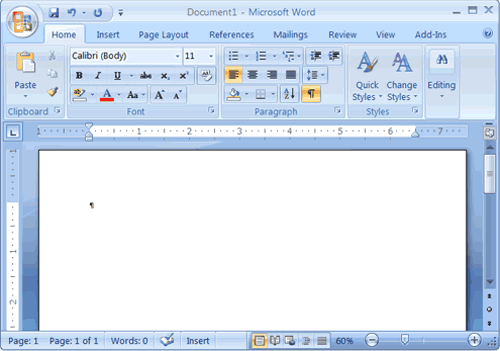
I used Microsoft office frequently during my research and planning. This was so I could display my thoughts and ideas that would go towards my music video in the future. I used microsoft word to create my questionnaires. also for my audience feedback to find out the thoughts and response from my target audience and other audiences included and to take advantage of the criticized feedback. I created the questionnaire on Microsoft word because it is a very easy to use and is very simple. As i have always used this programme to technologically type something, i am already familiar with almost evry icon and link on the programme.
Another program that I used from Microsoft Office was Powerpoint. I used it to display my research and planning in more compromised form to read and take in the information instead of displaying all pictures in a single blogpost. Powerpoint allows me to create graphs for my audience feedbacks results and can be displayed all in one Powerpoint. This makes it more efficient for space and complexity. Powerpoints allows you to add photos and different types of backgrounds to make it look more visual. We uploaded our Powerpoints to SlideShare and then embedded them into our blogs and they can be read more easily by other people. After discovering Prezi, powerpoint seems boring and lacks choice of variety. Prezi allowed me to express my evaluation better.
I used microsoft excel to create my graphs and results from my audience feedback which is a very clear way of displaying your results to an audience.it lets you use a variety of charts and editable graphs.

Blogger is a free blogging website in which we have organised all of our project,i haven'tused blogger before but i still found it easy to use. Although blog post organising can be difficult, it is easier if you label them so you can access directly where you want to re-visit on your blog.

Slideshare is a free site where you can convert slideshows to put them onto blogger, without this site, we wouldn't be able to upload slideshows to our blog. Before this year i had never used Slideshare, but i found it easy and effective to use. With out this programme we would have to post our evaluations straight onto a post which would reduce the effectiveness of a clear and visual way.

Final Cut is a programme in which you arrange the timeline, cut, order and edit footage which is in your video. Final Cut is an easy and simple programme to use, i didn't use it last year but a few years previous. I forgot how to use the programme properly but one i remembered the basics i picked up how to use it quickly. It was very time consuming editing all our footage, chroma keying was definitely the hardest part of our project and took the most time. The hardest part of editing was definitely getting the lip-syncing to match the music. We also have to use final cut in question 1 of our evaluation, the directors commentary. By the end, i learned how to use this quickly and simply and it was a big contributer to our final product.

We used a HD Sony camera that allowed us to catch the high quality music video. It allowed us to change the colour of the screening, zooming in or out of the shot and the basic setting on the camera made it a lot easier to operate. once i got used to setting the correct setting it was very easy to do once we got everythinh set up on the studio, which also gave us more time.


We used a tripod which allowed us to take a numerous amount of shot that varied from long shots too tilted low angle shots. It kept the camera steady so the filming didn't look poor quality and gave us the opportunity to reach angles we couldn't reach.
We also used the green screen that dropped at the back of the staged area. This enhanced our knowledge on the professional use of technology as it allowed us to have any background behind our artist and was edited on Final Cut. If you don'y have the correct lighting then the green colour would show on the video and make it look unprofessional and less affective to your target audience.


We used lighting in our production so we could improve the natural lighting in the studio and make the video look more professional.We use these lighting equipment to ensure that the green screen did not show on the video through the chroma key effect.It is also to prevent shadows on the artists faces.

I used this camera to take pictures of the equipment we used and to take of the images we used for our print ancillary work. It is a high standard quality camera which allowed us to create clear pictures with correct capture of lighting and high definition.

Prezi was the alternative option to power point presentation. It is a more exciting visual way to present your work. It is more advanced and gives you a wide range of selections and effects to use around the canvas of prezi. As i have used prezi before i found it relatively easy to use and mess around with. The only downside to prezi is that if you write to much on one presentation, the document will refuse to save.
Question 1- Directors Commentary- Aimee
Introduction to my evaluation- Aimee
For my evaluation, I will be including a director's commentary to show our music video into more detail . Secondly I will be producing a slideshow for question 2 to show what our brand image is for our video and our artist; this means I will be including the print work I produced to continue and push forward our brand image. In question 3 I will be using a site called 'Prezi' to further my technical skills. Finally in question 4 I will be talking about the technologies that I used in my group that helped us produce our video and ancillary projects. Also I will be talking about the problems and difficulties in using high advanced technologies.
Friday, 24 February 2012
Thursday, 16 February 2012
Evaluation Feedback - Aimee
A good start Aimee.
Question 2: Good on definitions of branding - don't forget to include your brand image ( the 3/4 words that sum up your artists image) then look at how this is pushed through the three products.
Good detailed analysis here and use of images.
Question Three: Include your initial target audience questionnaires and the graphs and charts done on these - sum up what you learned about your target audience and what they want from music videos etc...
Explain how you used these results to create your final products.
Then include the final audience feedback on your video ( graphs and charts too etc...)
Use this to sum up how effective, real and authentic you feel your final 3 products actually are.
Don't forget to look at the example evaluations on the Advanced Portfolio blog too to get an idea of what you are aiming at.
Miss McNulty
Question 2: Good on definitions of branding - don't forget to include your brand image ( the 3/4 words that sum up your artists image) then look at how this is pushed through the three products.
Good detailed analysis here and use of images.
Question Three: Include your initial target audience questionnaires and the graphs and charts done on these - sum up what you learned about your target audience and what they want from music videos etc...
Explain how you used these results to create your final products.
Then include the final audience feedback on your video ( graphs and charts too etc...)
Use this to sum up how effective, real and authentic you feel your final 3 products actually are.
Don't forget to look at the example evaluations on the Advanced Portfolio blog too to get an idea of what you are aiming at.
Miss McNulty
Final Feedback - group
Some good print products group - remember you need to put 2 album adverts on here and 6 panels for the CD covers!
Miss McNulty
Miss McNulty
Sunday, 5 February 2012
Saturday, 4 February 2012
Thursday, 2 February 2012
Evaluation- Question 4- Aimee
 When I started my Research and planning I used this site a lot because it broaden my research and it helped me gather ideas for my ancillary print work and the music video. This site is very easy and accessible to use and therefore it is very useful develop your music video from researching your music genre and the conventions of a music video. This is so my music video would become more appealing to my target audience by researching your brand image for your artist. Google is always being updated with recent new information and this is one of the best search engines to use because it is very fast running. I used this site to find pictures to explain my research and planning in my blog and also I used some pictures in my music video for example the brick wall background which I found off the Google website. I didnt have any difficulties in using Google because it the most popular search engine and I've been using it for years.
 Youtube is a great site for music videos because it can be watched by millions and is easily accessible I used this site quite frequently for my research tasks because since I was producing a music video, Youtube is the best example to search for music videos related to my music genre and this inspired my music video. It helps you analyse the music videos and the performance of the artist and does the artist meet its expectations to its music genre. These music videos were placed on our blog by using the embed code, in order to show what we are planning to do with our music video by using the similar conventions from official music videos.This can able you to watch the music video over and over again unlike watching it on a music channel and you can analyse its key points to the tiniest of details that catches your eye by pausing the video and rewinding. By using this site it helps you form your own brand image from the ideas you develop. Also we used Youtube to upload our music video and green screening practices by copying and pasting the embed code into the blog in order to show our progress through our research and planning and then towards our Final Piece which was the music video. The only difficulty with using YouTube is that on certain music videos, you are not able to copy the video's song due to the copyrights act.

I used Microsoft office quite alot during my research and planning, this was so I could display my thoughts and ideas that would go towards my music video in the future. I used microsoft word to create my questionnaires and my audience feedback to find out the thoughts and response from my target audience and other audiences included. I created the questionnaire on Microsoft word because it is a very easy to use and most people are familiar with it; I am able to change the colour of the text but usually black ink is the used regularly so I stuck with black and also I can change what type of font for my questionnaire and also being able to add photos as well. On the other hand on certain Microsoft word programs are old fashioned technology compared to the Apple Macs.
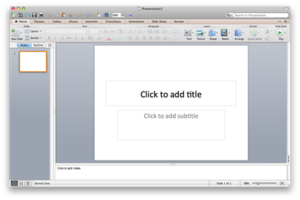
 Another program that I used from the Microsoft Office was Powerpoint and I used it to display my research and planning in more of easier way to read and take in the information unlike just displaying all pictures in a column down your blog. In Powerpoint, it allows you create graphs for your audience feedbacks results and this can be displayed all in one Powerpoint to many powerpoint slides and to just one blog post. This makes it more efficient for space and complexity. Powerpoints allows you to add photos and different types of backgrounds to make it look more exicted compared to a A4 sheet and a blog post. We uploaded our Powerpoints to SlideShare and then embedded them into our blogs and they can be read more easily by other people. However after using a site called 'Prezi' it makes Microsoft powerpoint very old fashioned to use because Prezi seems to be more complex to use. Myself still struggles to upload youtube videos on powerpoint as a slide unlike Prezi where I found straight forward.
 Microsoft Excel I used to create my graphs and results from my audience feedback which is a very clear way of displaying your findings towards your audience. It lets you use different types of graphs but the pie chart graph is the most easiest to read and you can see the percentage of your overall result. Although when producing charts on powerpoint, you still have to use excel and if you don't save the charts then your results can be lost, which is more time consuming.
 We used this site called Blogger because it is a new and more efficient way of recording down your coursework and presenting ideas and showing your progress through We used first in our research and planning stage but we used it throughout the whole of the project. It is very simple site to use , it allows you to add images and embed powerpoints. Also it allows you to keep up to date with any unfinished pieces of work. By using this site it can make your work look very professional and look very organised and also you can click on which post you want to view on the right side of the blog. I found this site very useful because I can display my ideas and thoughts and it helps you develop to your final piece. I used my blog because it was more helpful to record my coursework instead of giving paper sheets to a teacher so they could mark it. Being able to do this, it avoided the potential lost of coursework sheets, and each part of your course work could be done in a reasonable time. Also the teacher could comment on a post and give you feedback about how you should improve your blog. This was helpful because it was not time consuming and I could work individually on my own and update whenever I wanted to and from any computer with internet access. Also the teacher could comment on a post and give you feedback about how you should improve your blog. The only problem I have experienced with this site is that if the internet fails then you can not enter your blog and post new information on your blog.
We used this site to find our font for our brand image and the artist. Since we were a Grime music genre we had to find something that was slick and cool and also something that stood out to catch our audience's attention. It is important to choose a font because the font needs to be the artist's trade mark. For my album cover and advertisement poster I used a font called 'Pornstar Academy' which are huge american style football letters which worked best for our artist's image. The only problem with this site is that you have to own a Apple Mac computer so you can download different fonts therefore advanced technology has to be involved if you want to create professional quality work.


 To upload my powerpoints on to blogger, I used Slideshare and Scribd because once you log into your account it allows you to upload any powerpoint or word document which saves space in your blog as it is only one blog post that is submitted. You can choose privacy if you wanted to share your powerpoint or word document with the public. After it was uploaded on Slideshare or Scribd, you then copy and paste the embed code and then pasted it on your blog by changing the setting to 'Edit HTML' and post your blog on the site and then you have a powerpoint in one post. This is helpful because you can write as much as you want in your powerpoint since you can enlarge the powerpoint presentation to full computer screen size. It very simple and easy to use and you can access from any computer, which makes it more beneficial to blog users like me. However sometimes the blog posts don't show up on the blog and become blank so you would have to upload it again.
 Apple iMacs were used through out our work, during our research and development in order to get professional quality for our products in the music industry. IMacs is very efficient to use and very fast which is great for designing our print work and editing our music video; once you had got to grips with the software it becomes more easier to use and it helps you broaden your ideas. For our entire project, this type of computer allowed us to use more equip programs such as InDesign, PhotoShop and Final Cut which enhance the professional quality to our products. On the other hand using Apple Macs are completely different compared to Microsoft computer because all the setting are the opposite to Microsoft; for example there is no right click unless you press a certain key, but you would have to get all your information from a tab at the top of the screen.
 When I was using PhotoShop for my Print projects, I did find it a bit hard to use because it had been so long since I last used but once I got stuck into the project I found it the gradient tools very easy to use. By using this program it enhances your print work to a professional standard. We used this program to edit our photos to enhance the quality and make them stand out more to the audience. We did this by cutting around the character and placing different backgrounds in order to stick with the artists brand image where he included the colour pink into his music video. To do this you would have two layers and you can lock the layers in case they got deleted when they weren't being used. For my poster advertisement I made the photo black and white for his character which is a very striking image and catches your eye instantly. I used the image colum above the screen which allows me to edit the quality of the photo such as the contrast, the saturation and many more tools to enhance the photo as it is.
With PhotoShop it allowed to try out new ways of presenting my print work to the audience. For my album cover I use to two of the same images and placed one on top of the other to make him stand out more and surprisingly it enhance the quality of the picture by outlining his figure more. For album panel I used PhotoShop to edit my back ground image which is the brick wall where I used a washout effect on the brick wall and the artist as well so the lyrics on the album panel would stand out better.


InDesign is a completly different program compared to PhotoShop because all the fiddly bits have been done in PhotoShop and then when it comes to InDesign you are obviously designing your Print work which is straight forward if you have used this program before. In InDesign you are able to place text boxes, shapes and images in order to create your print work. Unlike Microsoft InDesign can offer a wider range of different styles of fonts, and this helped alot because we could find something that is suited to our music genre and fitted our brand image. InDesign is a very advanced software and this program can make your print work look very professional and more appealing to your audience. It had a lot of helpful tools for me to achieve the standard of work I put into my ancillary tasks. InDesign has a list of all of the different colours that I could use which allowed to choose from different shades of pink, I did this by using the colour swatches which meant I was able to experiment with colour and this helped me to right colour of pink that would go towards my album cover and advertisement poster. When you start using InDesign you had to choose your template in order to fit a square shaped album cover whereas for a poster it was obviously an A4 template. This enabled you work like a professional by following the typical rules of branding and advertisement. For my album cover I used stripes for my background however I did place them over the artist and used the transparent tool in order to see my artist and for the pink stripes not to stand out more than the photo of the artist which works well because I stuck to the brand image of my artist. I used a vigetta effect on my album cover and poster because the shadowing light around the slides and around the artist highlighted his figure and made him stand out more. In my album panel I made the heart transparent in order to see the artist and the especially the lyrics which is the main purpose in this piece of artwork. On InDesign you were able to crop and cut your images so it fitted into the space of the page. For my poster I cropped the album cover and placed it in the corner but instead of dragging the picture to that size, you have to click on ctrl and shift or you would be cutting your picture instead. InDesign is difficult to use at first due to the hundreds of options that edit your artwork but in the end it became straight forward for me.

 Final Cut we used to create our music video, by editing and cutting footage to piece it together. At first I found it quite difficult to use because I was so familiar with using InDesign and PhotoShop but after a while it became more easier to use. You would start a new document and place your footage in the left hand box which allows you to watch the parts of your video and then cut and paste the parts which you will used in your music video. Once you have cut it , you can then drag it on to the timeline. This a simple progress to do and before you know it you have all the footage for your music video on the time line. Before you add the music on to the time you should mute all the footage so there is no background noise when the music video is completed; you would have to click on the lock button in order to keep that sound without being deleted. This goes for the video time line as well, it helps because it avoids deleting footage from your video.
 After that you can start added special effects to each part of your video to make it more exciting. You would have to use the razor tool which allows you to cut certain parts of your footage and then you are able to drag effects on to each cut part. This makes one scene have many effects and more exciting to watch for the audience.
 The colour can be edited to make backgrounds suited the character in the video because I found out after green screening the background and the artist were two different colours and did not match together which did not look very professional but after I changed the colour of the artist, it looked like the background light had reflected on to him and look more realistic, I did this on the brick wall background. I used a heart image and made a flicking image to move which was one of main effects we wanted in the video. I used a dazzle glow effect on the heart to have this neon effect and for it to look more suited to the music video. In Final Cut we used a lot of green screening so we had to drag a chroma key effect on to the footage in order to remove the green back ground and place another back ground which suited the video.
 On video timeline you have different layers which enable you to put two different scenes of footage on the time line at the same time; this allowed me to over lap my footage like the couple of the boy and girl and the pulsing heart which looks very effective and you want your audience to be entertained during the music video.

After all that it would be exported on QuickTime in order to be compatible for You Tube software when uploading your video, this can take a while to upload. I would only use Quicktime after I had finished my directors commentary and music video on Final Cut.

 We used a HD Sony video camera to give the best quality footage to make our music video look more professional. It wasn't hard to use the camera the camera because it is very straight forward, it allowed us to focus on the person if we zoomed and it enhanced the lighting to match the green screening. The only problem we had with the camera was that the software was not high enough to take footage when we used a stroke light in our video.
We used a tripod to make our camera steady and this could be adjusted to any level which helped alot when we wanted to shoot low angle shots in the video.
 We used a green screen for all our shots, this is a back drop which allows you to use different backgrounds when you are editing on Final Cut I found this really professional because you enhancing your knowledge on technology and how to use it. The only problem you could experience with this type of technology is that if you don't use the correct sort of lighting then the green screening will not be as effective.
 We used lighting equipment for our production during the music video, this was so it created the best possible light for the green screen and character in the music video. This creates better footage on the camera with professional lighting because it highlights the figure of the character and no shadows are involved which could ruin the video.
  We used this camera to take the photos for our print project and our planning and research stages. This camera is great because it can take fast still images and it can change the setting of atmosphere such as the lighting and background for our pictures. It took very clear shots and made our pictures live up to professional standard. However since I don't use cameras like this often I found it quite complex to use at first.
 We used this 'firewire' to upload our music video and audience feedback on to the computer to post on to our blogs. We had to connect it to the camera and then the computer and then press select and then it would upload our footage, this could be done on Final Cut or iMovie, but Final Cut is a better program to use in the future. When I used 'fire wire' I found it difficult because I didnt know how to use since I was more use to using a camera cable then this one. It is difficult if you have not used one before so therefore you would need a technician to help you.
Prezi is similar to power point but more advanced technology compared to basic Microsoft programs. At first Prezi was really complicated to use since I had never used it before but after a few attempts, it becomes very easy to use. Just like Powerpoint it enables you to upload pictures and videos but unlike clicking on to the next slide like powerpoint, Prezi is like going through a mind map. Although clicking on to next piece of information can make you feel a bit sick depending on how much you have written on Prezi. I found it really useful uploading pictures and videos from youtube rather than using Microsoft powerpoint because it was a shown in good quality and less time consuming. In the top left hand corner is where all your tools are which is a lot better than powerpoint where all the tools are in different place and harder to find as well. The down side to this site is that on Prezi you can have too much information and the site refuses to save your work, therefore cutting down on how much you should write on this site. I used Prezi to produce my evaluation questions.
 I used a site called 'KeepVid' to download videos from YouTube so I could use them in my director commentary. Before I used similar sites like 'KeepVid' but most took too long to download or they were not compatiable. KeepVid is very easy site to use because all you have to do is copy and paste the link to the video into a white tab and then click download. The only problem is that sometimes it may not download the video properly and you have to try for an second attempt.
Conclusion:
After our audience feedback and our evaluated music video, there are some elements that I wish we could of done differently or improved. In our music video I would liked of filmed locations shots instead of being all studio based because it would of gave more a variety of settings and entertained our audience more since this was one of the improvements mentioned in our questionnaires. By having location shots, we could of made our video longer and not have it ended on a short note. Our story boards was not followed to plan and I would of liked to of included the foot taping and the amp scene to en lengthen the durations of the video to make the video have more cinematography and a variety of different types of scenes.
I really did enjoyed researching, planning and evaluating my music video through the whole process. Especially using the different types of technology to produce our music video and ancillary to a professional standard.
Our artist was the perfect choice because he acted confident towards the camera and gives the audience a more realistic affect that he is lip syncing properly and how well he performs.
I think we did a really good job of editing and using the green screen to use different types of backgrounds. I thought the beating neon heart really fitted well with the brand image and music genre.
Overall I think our music video progressed really well due to the amount of editing we put in since we didnt have any location shots and the amount of footage we had filmed on that day. We got all positive feedback from our audience which shows that we achieved the conventions of a music video and the conventions of a Grime music genre.
Subscribe to:
Comments (Atom)